



Logoly – AI Logo Maker IPA for iOS
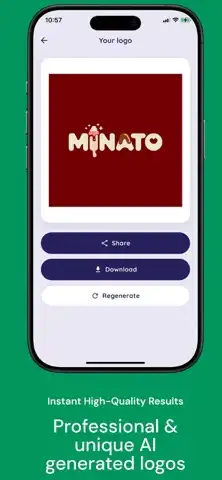
Logoly – AI Logo Maker is an AI-powered graphics and design app that helps users create logo concepts from simple text ideas. Instead of spending hours learning complicated design software, users can describe a brand, choose a preferred visual direction, and generate logo concepts quickly. The App Store lists the app under Graphics & Design and identifies Tiny Leo Co., Ltd as the developer for the iOS version with App Store ID 6468386671.
The app is designed for entrepreneurs, content creators, online stores, gaming teams, startups, and anyone who needs a visual identity without starting from a blank canvas. Its AI-based workflow focuses on generating different logo directions and presenting them in realistic mockups.
Logoly – AI Logo Maker Features and Functions
AI Logo Generation
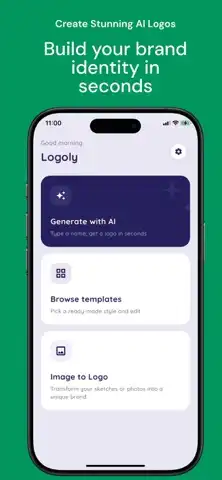
The main function of Logoly is AI-powered logo generation. Users can enter a text description or idea and allow the app to turn that concept into logo designs. This makes it useful when you have a brand name or concept but do not know how to translate it into a visual identity.
Multiple Logo Styles
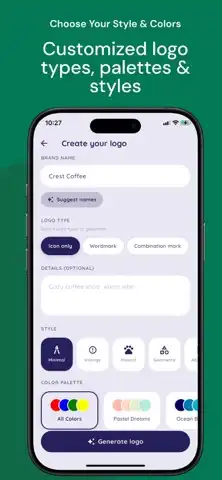
Logoly provides different creative directions so users can experiment with the appearance of their brand. The available approaches include minimal and modern designs as well as bold, luxury, mascot, and esports-inspired styles. This variety makes it possible to explore different visual identities before choosing a preferred concept.
Text-to-Logo Workflow
The text-based workflow is one of the simplest functions of the app. Instead of manually drawing shapes, users can describe what they want and let the AI produce logo concepts. This can make early-stage branding considerably faster.
Business and Brand Logos
The app can be used to develop visual concepts for businesses, online stores, personal brands, and startup projects. Users can experiment with different symbols, layouts, moods, and styles to find a direction that fits their brand.
Gaming and Esports Designs
Gaming teams and esports creators can also use the app to explore mascot-style, bold, or competitive logo concepts. These designs can provide starting points for team branding, social profiles, gaming communities, and content channels.
Logo Mockups
One of Logoly’s useful functions is logo mockup creation. The app allows users to see a generated logo in realistic presentations rather than viewing it only as a flat design. Earlier updates introduced logo mockups and later added the ability to select a ratio for mockup creation.
Company Image Management
Recent updates expanded the app beyond basic logo creation. The developer added functionality for managing a company’s visual image across formats ranging from business cards to advertising content. This can help users think about branding beyond the logo itself.
Name and Symbol Style
A Name+Symbol style was added in an earlier major update, giving users another way to combine brand text with a visual symbol. This can be useful for companies that want both recognizable lettering and an icon-based identity.
Fast Concept Exploration
Logoly is particularly useful during the brainstorming stage. Instead of committing to one design immediately, users can generate multiple directions and compare different visual ideas. This makes the app suitable for experimenting with branding before investing in professional design work.
Premium, Subscription and IPA Considerations
Premium Availability
Logoly is listed as a free app with in-app purchases. The App Store currently lists several subscription options, including weekly, monthly, yearly, and lifetime premium plans, although prices can vary by region.
Premium availability can provide access to paid features or additional usage depending on the subscription offered by the developer. Because the title provided here does not explicitly say “MOD” or “Premium,” this article does not claim that an unofficial IPA has premium features unlocked.
Be Careful With Modified IPA Files
If you encounter websites offering “Logoly MOD IPA,” “Premium Unlocked IPA,” or similar downloads, remember that these are not necessarily official releases from the developer. Modified applications can have compatibility, privacy, signing, or security issues. The safest option is to use the official App Store release whenever possible.
How to Install Logoly on iPhone and iPad
Official Installation on iPhone
Logoly’s current App Store listing identifies it as an iPhone application and requires iOS 18.0 or later.
To install the official version:
- Open the App Store on your iPhone.
- Search for Logoly: AI Logo Generator.
- Check that the developer is Tiny Leo Co., Ltd.
- Tap Get.
- Authenticate with Face ID, Touch ID, or your Apple Account password.
- Wait for installation to finish.
- Open Logoly and begin creating your logo.
Installing on iPad
The current listing is marked as designed for iPhone, so iPad availability and presentation may differ from a native iPad application. If the App Store allows the compatible iPhone version to be installed on your iPad, you can download it normally through the App Store.
For IPA files obtained from unofficial sources, installation is different and generally requires an appropriate sideloading method and a valid signing arrangement. Avoid installing files from unknown sources simply because they advertise unlocked features.
iOS Compatibility and Latest Versions
Current iOS Requirement
According to the current App Store information, the Logoly AI Logo Generator listing requires iOS 18.0 or later on iPhone. The listed version is 2.5.9, and the app has continued receiving bug fixes and improvements.
Therefore, devices running iOS 18 or newer meet the published minimum requirement. Compatibility with future iOS releases can change as Apple and the developer introduce new system versions, so users should always check the latest App Store listing before installing or updating.
App Size and Category
The App Store lists the app at approximately 194.6 MB and categorizes it under Graphics & Design. It is also listed as containing advertising and in-app purchases.
Frequently Asked Questions
Is Logoly AI Logo Maker free on iPhone?
Logoly is listed as a free download with in-app purchases. Some features or usage options may require a paid subscription.
What can I create with Logoly?
You can generate logo concepts for businesses, personal brands, stores, gaming projects, startups, and creator identities using text-based AI generation.
Does Logoly work without design experience?
Yes. Its main workflow is designed around entering an idea and selecting creative directions, so users do not need advanced graphic-design knowledge to experiment with logo concepts.
Does Logoly support logo mockups?
Yes. Logo mockup functionality was introduced in previous updates, with later updates adding ratio selection for mockup creation.
What iOS version does Logoly require?
The current App Store listing states that Logoly requires iOS 18.0 or later.
Is Logoly available for iPad?
The listing identifies Logoly as designed for iPhone rather than a native iPad app. Availability and display on an iPad can therefore depend on the App Store compatibility offered for your device.
Who develops Logoly?
The current iOS listing identifies Tiny Leo Co., Ltd as the developer/provider.
Is Logoly good for a new business?
It can be useful for generating initial concepts and exploring different branding directions. For a final commercial identity, users may still want to refine the chosen concept with professional design tools.
Conclusion
Logoly – AI Logo Maker provides a straightforward way to turn text ideas into logo concepts using AI. Its combination of text-based generation, multiple design styles, branding concepts, logo mockups, and company-image tools makes it useful for startups, creators, online stores, gaming communities, and personal projects.
The official iOS version is currently listed as a free download with in-app purchases and requires iOS 18.0 or later. Since the app continues to receive updates, checking the official App Store listing is the best way to confirm the latest version and compatibility before installation.