
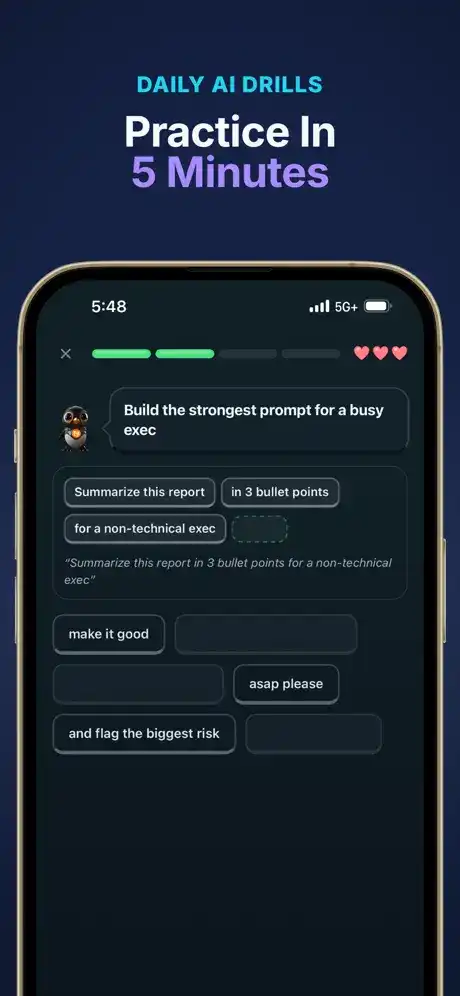




Iro AI — Learn AI Skills is an educational iOS app designed to help users develop practical artificial intelligence skills through short lessons, interactive exercises, challenges, and AI-powered coaching. Instead of requiring users to watch long tutorials or complete traditional courses, Iro focuses on bite-sized learning sessions that can be completed in around five minutes a day.
The app covers important areas such as AI foundations, prompt engineering, automation, AI agents, AI-powered productivity, coding concepts, and practical workplace applications. It also includes dedicated learning paths for popular AI tools such as ChatGPT, Claude, Gemini, Perplexity, and other platforms.
Iro AI is listed in the Education category and is developed by Alexander Furukawa. The App Store currently lists the app at around 122 MB and requires iOS 15.1 or later.
All Functions and Features of Iro AI
Short AI Learning Lessons
Iro AI is built around short learning sessions that make AI education easier to fit into a daily routine. Lessons explain individual concepts before giving users opportunities to practice them. This approach is useful for people who want to gradually improve their AI knowledge instead of trying to learn everything in one sitting.
Interactive Exercises
The app provides interactive exercises rather than relying only on reading. Users can practice concepts, answer questions, review explanations, and apply what they learn. The current App Store listing reports hundreds of lessons and thousands of exercises across multiple learning paths.
Prompt Engineering Practice
Prompt engineering is an important part of Iro AI. Users can learn how to write clearer instructions, improve weak prompts, and understand how different prompts can affect AI-generated results.
Prompt Lab
Prompt Lab allows users to work with prompts and receive feedback on their performance. According to the App Store listing, users can prompt a real AI model and have their prompt graded, making the feature more practical than simply reading examples.
Image Lab
Image Lab allows users to turn prompts into generated images. This gives learners an opportunity to understand how descriptive instructions can be used with image-generation systems.
Ask Iro AI Coach
Ask Iro works as a personal AI learning coach. Users can ask questions when they need additional help with a lesson or concept. Recent versions also allow the coach to work with photos, such as screenshots, forms, or diagrams.
AI Learning Paths
Iro organizes its educational content into structured learning paths. These cover areas such as AI foundations, prompt engineering, automation, AI agents, AI career skills, and AI-assisted coding.
The app also provides paths focused on popular AI tools, including ChatGPT, Claude, Gemini, Grok, Copilot, Perplexity, NotebookLM, Suno, and ElevenLabs.
Custom Learning Paths
Users can create personalized learning paths around subjects they want to understand. Iro can also turn online content into structured learning material. The current version supports sources such as TikTok, YouTube, Reddit, web links, articles, and PDFs.
Podcast Mode
Podcast mode lets users listen to lessons instead of only reading them. Lessons can be presented as a two-host style audio experience, making it possible to learn while walking, commuting, or doing other activities.
Gamified Learning
Iro uses game-style elements to make learning more interactive. Users can earn XP, maintain streaks, complete daily challenges, participate in AI Duels, and progress through ranks. Its evolving mascot and progress systems add another layer to the learning experience.
AI News Briefings
The app provides weekly AI news briefings in simpler language. This can help learners keep track of important developments in the rapidly changing AI field without having to follow every technical announcement themselves.
Skill Progress Tracking
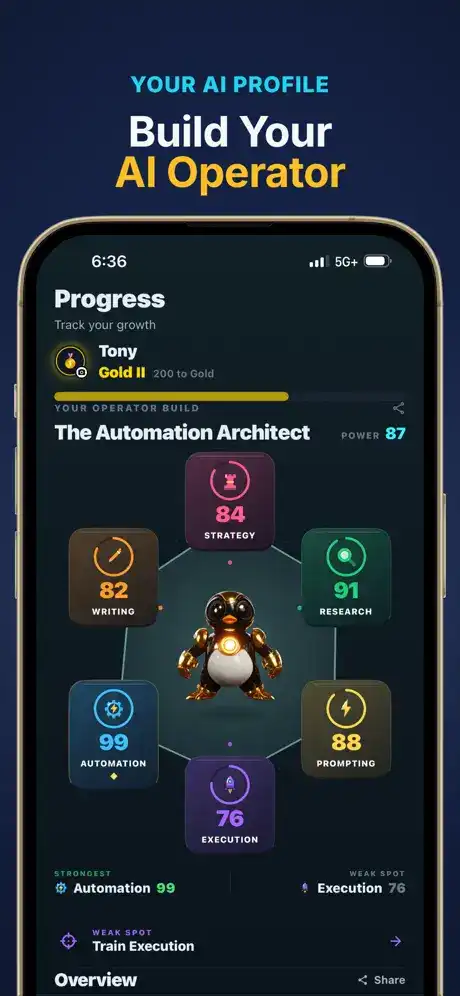
Iro provides progress-oriented features that help users see how their AI abilities are developing. Its skill system includes areas such as strategy, research, writing, prompting, automation, and execution.
Certificates
Users can earn certificates after completing eligible learning paths. The certificates are designed to be shareable and can be useful for displaying completed learning achievements on platforms such as LinkedIn.
Iro AI Free and Pro Features
Iro AI can be downloaded for free, while some advanced functionality is provided through its Pro subscription. The free experience includes access to learning paths, a daily lesson system, weekly AI news, limited Ask Iro access, streaks, XP, and ranks.
Pro features include unlimited lessons, Podcast Mode, Prompt Lab, Image Lab, unlimited AI Duels, unlimited Ask Iro usage, expanded custom and community paths, the full prompt library, and certificate claiming. The exact subscription options and prices can vary by App Store region.
Because the title is Iro AI — Learn AI Skills IPA, rather than an official “MOD” release, this article does not treat unofficial IPA modifications as official Pro features.
How to Use Iro AI on iPhone
Choose Your Learning Path
After opening Iro AI, choose an area that matches your learning goal. Beginners can start with AI fundamentals, while experienced users can explore advanced subjects such as automation, AI agents, or coding.
Complete Daily Lessons
Spend a few minutes completing a lesson and its exercises. Regular practice can help turn individual concepts into a consistent learning routine.
Practice With AI Tools
Use available interactive features such as Prompt Lab and Ask Iro to move beyond theoretical learning and practice AI-related tasks.
Track Your Progress
XP, streaks, ranks, challenges, and learning paths help you monitor your activity and maintain a regular learning schedule.
How to Download and Install Iro AI on iPhone and iPad
Installing on iPhone
The official App Store listing identifies Iro AI as an iPhone app. To install it, open the App Store, search for Iro AI — Learn AI Skills, select the official listing from Alexander Furukawa, and tap Get. Authenticate with Face ID, Touch ID, or your Apple Account password when requested.
Using Iro AI on iPad
The current App Store information identifies Iro AI as iPhone-only, so it is not presented as a native iPad application. Users should check the App Store compatibility information on their particular iPad before attempting installation.
Iro also offers a browser-based version through its website, allowing users to access lessons without installing the iOS application.
Is Iro AI Supported on the Latest iOS Versions?
iOS Compatibility
The App Store currently states that Iro AI requires iOS 15.1 or later. Therefore, iPhones running newer iOS versions that remain compatible with the app can meet the stated minimum requirement.
Apple’s App Store listing should always be checked before installation because application compatibility can change when developers release new updates.
FAQs About Iro AI
Is Iro AI free on iPhone?
Yes. Iro AI is available as a free download with in-app purchases. Some advanced features require an Iro Pro subscription.
What can I learn with Iro AI?
You can learn AI fundamentals, prompt engineering, automation, AI agents, AI-assisted coding, productivity techniques, and practical use of popular AI platforms.
Does Iro AI require previous AI experience?
No. The developer describes beginner paths as suitable for people starting from zero, while advanced paths are available for users who already have AI experience.
Does Iro AI work on iPad?
The current App Store listing identifies the application as iPhone-only.
What iOS version does Iro AI require?
The current App Store listing says Iro AI requires iOS 15.1 or later.
Does Iro AI have an Android app?
The developer’s website currently states that an Android version is in development, while the service can be accessed through an Android browser.
Conclusion
Iro AI — Learn AI Skills offers a structured way to build practical AI knowledge through short lessons, interactive exercises, prompt practice, AI coaching, custom learning paths, challenges, and progress tracking. Its focus on short daily sessions makes the platform suitable for learners who want to develop AI skills gradually.
With content covering AI fundamentals, prompt engineering, automation, agents, coding, productivity, and popular AI tools, Iro provides multiple learning directions for beginners and more experienced users. The free version provides a starting point, while Pro adds additional learning and practice features.