
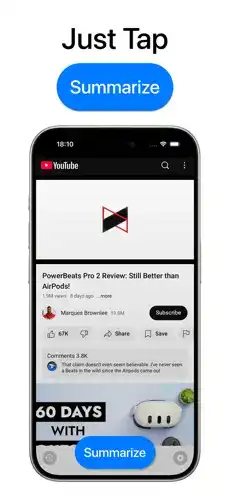
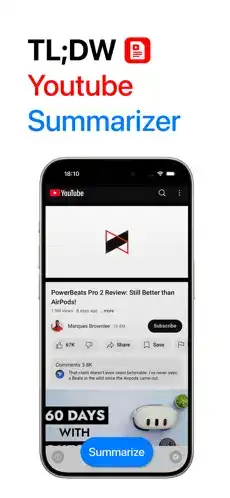
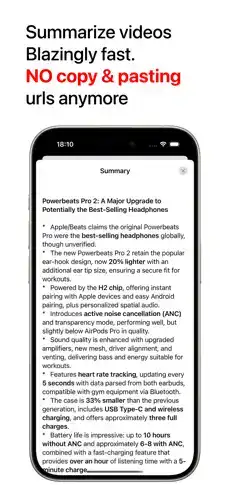
TLDW: YouTube Summaries is designed for people who want to understand the main points of YouTube videos without spending the full amount of time watching them. The app focuses on turning lengthy video content into concise, easier-to-read summaries, making it useful for students, professionals, researchers, and everyday viewers.
Whether you are dealing with a one-hour lecture, a long interview, a podcast, a tutorial, or a news discussion, a summarization tool can help you quickly identify the important information. TLDW is particularly appealing when you have a large watchlist but limited time.
TLDW: YouTube Summaries Features and Functions
YouTube Video Summarization
The primary function of TLDW is to summarize YouTube videos. Instead of watching an entire video to discover its important points, users can obtain a condensed overview of the content. This makes it easier to decide whether a video deserves a complete watch.
Key Points at a Glance
Long videos can contain a considerable amount of information, but not every section is equally important. TLDW helps focus attention on the central ideas by presenting the video’s information in a shorter format. Users can scan the summary and understand the general subject before deciding whether to continue watching.
Time-Saving Workflow
One of the biggest advantages of a YouTube summarizer is convenience. A lengthy video may require 30 minutes, an hour, or even longer to watch. A concise summary can provide an initial understanding much faster, allowing users to spend their available time on the most relevant content.
Simple Video-Based Workflow
TLDW is intended to make the summarization process straightforward. Rather than manually taking notes while watching, users can work from the generated summary. This can be especially useful when reviewing multiple videos for research, learning, or general information.
Useful for Educational Content
YouTube contains thousands of educational videos, tutorials, lectures, explanations, and study resources. TLDW can help learners identify the main concepts from these videos before investing time in watching them completely.
Students can use summaries as a quick revision aid, while still referring to the original video whenever they need detailed explanations or visual demonstrations.
Research Assistance
Researchers and information seekers frequently encounter long interviews, presentations, discussions, and educational recordings. Reading a concise overview can make the initial research process more efficient.
The summary can help users determine whether a particular video contains information relevant to their research topic.
Quick Content Discovery
TLDW can also function as a content-discovery companion. Instead of opening several lengthy videos and watching them individually, users can first examine their summaries and prioritize the most useful content.
This approach can make a large YouTube watchlist much easier to manage.
Easy-to-Read Information
A good summary should reduce unnecessary information while keeping the central message understandable. TLDW’s concept revolves around presenting video information in a more digestible form, helping users consume knowledge without dealing with every minute of the original recording.
Multiple Types of Long Videos
A summarization app can be useful across different YouTube categories, including:
- Educational lectures
- Tutorials and guides
- Interviews
- Podcasts
- Technology videos
- Documentaries
- News discussions
- Product explanations
- Business presentations
- General informational content
Convenient for Busy Users
People who have limited free time can benefit from quickly reviewing video content. TLDW can provide an initial overview when watching the entire video is inconvenient.
This does not replace the original content, but it can help users decide which videos deserve their full attention.
Reduced Note-Taking Effort
Manually creating notes from a long video can be tedious. A summarization tool can reduce the amount of information users need to write down during the first review.
For serious study or research, however, users should verify important details against the original video rather than relying exclusively on an automated summary.
How to Use TLDW and Who Should Use It
How to Use TLDW: YouTube Summaries
The exact interface can vary depending on the app version, but the general workflow for a YouTube summarization application is straightforward.
- Open TLDW on your iPhone or iPad.
- Select the option for processing or summarizing a YouTube video.
- Provide the supported YouTube video information, such as a video link, if requested.
- Start the summarization process.
- Wait while the application processes the available video information.
- Review the generated summary and key points.
- Return to the original YouTube video when you need complete context or additional details.
For important subjects, treat the generated summary as a convenient overview rather than a perfect replacement for the original video.
Who Should Use TLDW?
TLDW can be useful for a broad range of users who regularly consume long-form YouTube content.
Students: Students can use summaries to quickly review lectures, tutorials, and educational discussions.
Professionals: Employees and business users can use summaries to preview presentations, interviews, industry discussions, and educational material.
Researchers: Researchers can use concise overviews to identify potentially useful videos before spending significant time reviewing them.
Content Creators: Creators can use summaries to quickly understand reference material and research topics.
Busy YouTube Viewers: Anyone with a large watchlist can use summaries to prioritize the videos that are most relevant.
Important Considerations
Automated summaries may occasionally misunderstand context, technical terminology, humor, accents, or complicated explanations. For academic, professional, financial, legal, or otherwise important information, verify significant claims using the original video and reliable sources.
Installation and iOS Compatibility
How to Install TLDW on iPhone
If TLDW is distributed through Apple’s official App Store, the safest installation method is to search for the application directly in the App Store, check its listed iOS requirements, and tap Get to install it.
If you are referring specifically to an IPA file, installation is different from downloading a normal App Store application. IPA installation may require a compatible signing or sideloading method, and users should only install IPA files from sources they trust.
Avoid installing modified or unknown IPA packages simply because they claim to provide unlocked functionality. Such packages can create privacy, security, compatibility, or account-related risks.
How to Install TLDW on iPad
On an iPad, users can similarly look for the official application through the App Store if the app supports iPadOS. If an IPA is being used instead, a compatible sideloading/signing process is required.
Before installation, check the app’s current system requirements and make sure the iPad has enough available storage.
Is TLDW Supported on the Latest iOS Versions?
Compatibility depends on the specific TLDW release and its minimum iOS requirement. iOS applications can receive updates that change supported operating-system versions, so compatibility should be confirmed from the app’s current App Store listing or developer documentation.
If an IPA is an older build, it may not behave exactly like the latest App Store release on newer iOS versions. Features, permissions, APIs, and signing requirements can also change after an iOS update.
Premium or MOD Features
The title “TLDW: YouTube Summaries IPA” does not explicitly mention Premium, MOD, or Premium Unlocked, so there are no specific MOD/Premium features to claim here.
If a particular release is officially labeled as Premium or modified, its advertised capabilities should be verified against that exact version rather than assuming that every IPA build contains the same unlocked features.
Frequently Asked Questions
What is TLDW: YouTube Summaries?
TLDW is a YouTube-focused summarization concept that helps users understand the main information from videos in a shorter, more convenient format.
Can TLDW summarize long YouTube videos?
Its main purpose is to provide concise information from YouTube videos, making it particularly useful for lengthy content such as lectures, podcasts, interviews, and tutorials.
Is TLDW available for iPhone?
Availability can depend on the current release and distribution method. Users should check the current official App Store listing for iPhone compatibility.
Can I use TLDW on iPad?
If the current version supports iPadOS, it can be used on compatible iPad models. Always check the application’s latest compatibility requirements before installing.
Does TLDW replace watching YouTube videos?
Not completely. A summary provides an overview, while the original video contains the complete explanation, demonstrations, context, and details.
Is a YouTube summary always accurate?
No automated summary should be considered perfect. Important information should be checked against the original video and other trustworthy sources.
Does TLDW work with every YouTube video?
Support can depend on the video’s available information, language, accessibility, and the application’s current capabilities. Therefore, compatibility may vary from video to video.
Can students use TLDW for studying?
Yes, a YouTube summarizer can be useful for quickly reviewing educational videos and identifying important concepts. Students should still consult the original material for detailed learning.
Is TLDW free?
Pricing and available features depend on the current version and distribution model. Check the latest official listing for current subscription or purchase information.
Is TLDW safe to install?
The safest option is to obtain applications from official distribution channels. Unknown or modified IPA files can introduce additional security and privacy risks.
Conclusion
TLDW: YouTube Summaries offers a practical approach to consuming the enormous amount of information available on YouTube. Its main appeal is simple: instead of immediately committing to a long video, users can first obtain a concise overview and decide whether the full content is worth their time.
The app can be particularly valuable for students, researchers, professionals, and anyone who regularly watches educational or long-form YouTube content. Summaries can make content discovery faster, reduce initial note-taking, and help users prioritize their watchlists.
At the same time, automated summaries should be treated as a convenience rather than a guaranteed replacement for original content. When accuracy and context matter, the complete YouTube video remains the better source. For iPhone and iPad users, checking the latest official compatibility and installation requirements is also important before choosing a particular TLDW release.