


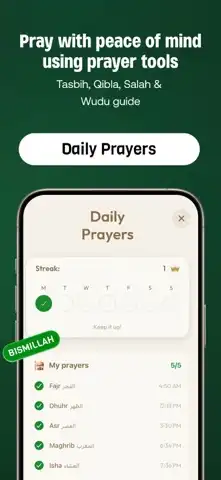

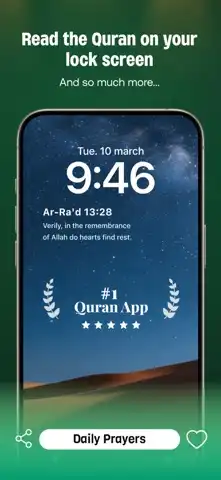

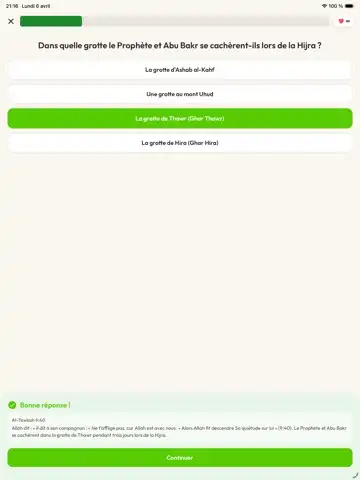



EasyQuran: Islam & Qibla is an Islamic application designed for iPhone and iPad users who want convenient access to Quran reading and essential Islamic tools in one place. The app combines Quran-related resources with practical features such as Qibla direction, prayer-related information, and other tools that can support a user’s daily routine.
A mobile Islamic application can be particularly useful because it allows users to access religious resources wherever they are. Whether someone wants to read Quran, check a Qibla direction while travelling, or explore Islamic information, having these features available on an iPhone or iPad can be convenient.
The EasyQuran experience focuses on accessibility and straightforward navigation. Its design is intended to make important Islamic resources easier to reach without requiring users to switch between multiple applications.
All Features and Functions
Quran Reading
The main purpose of EasyQuran is to provide access to Quran reading on iOS devices. Users can open the Quran and read its chapters directly from their iPhone or iPad. A dedicated reading interface can make it easier to continue reading during free time, travel, or daily religious routines.
Qibla Direction
The Qibla feature helps users determine the direction of the Kaaba from their current location. This can be particularly helpful when travelling or visiting an unfamiliar place where the Qibla direction may not be immediately obvious.
Islamic Resources
EasyQuran brings several Islamic resources together within one application. Instead of relying on separate tools for different needs, users can access relevant religious functions from a single interface.
Easy Navigation
A useful religious application should be simple enough for everyday use. EasyQuran is designed around straightforward navigation, allowing users to move between its Quran and Islamic tools without a complicated setup.
Mobile Reading Experience
Reading Quran on a smartphone requires an interface that works well on a smaller display. EasyQuran provides a mobile-oriented reading experience so users can comfortably view Quranic content on an iPhone screen.
iPad Support
The larger display of an iPad can provide a more spacious reading experience. Users who prefer reading on a tablet can benefit from the additional screen area when browsing Quranic content and other available features.
Location-Based Features
Some Islamic tools depend on the user’s location. Location access can help applications provide more relevant information, particularly when features such as Qibla direction or location-based religious information are involved.
Daily Islamic Use
EasyQuran can be used as part of a regular Islamic routine. Having Quran reading and Qibla-related tools available on a device can make it easier to access them whenever required.
Search and Content Access
Depending on the specific application version, users may have tools for locating Quranic content or moving through available sections more efficiently. Such functions are useful when someone wants to reach a particular part of the Quran without browsing manually.
Touch-Friendly Controls
The application is designed for touchscreen devices, allowing users to interact with Quran pages and menus through familiar iPhone and iPad gestures.
How to Download and Install EasyQuran IPA on iPhone and iPad
Download EasyQuran IPA
If you are specifically looking for an IPA version, first obtain the file from a source you trust. Before installing, verify the application name, version number, and compatibility information.
IPA files distributed outside Apple’s App Store can be modified or repackaged, so users should be careful about downloading files from unknown websites. Whenever possible, the official App Store or developer-provided distribution should be preferred.
Install on iPhone
An IPA file normally cannot be installed on a standard iPhone simply by opening it. A compatible sideloading or signing method may be required.
The general installation process is:
- Download the EasyQuran IPA from a trusted source.
- Prepare a compatible IPA signing or sideloading tool.
- Import the IPA into the selected installation tool.
- Sign the application using an appropriate Apple account or valid certificate.
- Install the application on your iPhone.
- Complete any required developer-trust or device authorization steps.
- Open EasyQuran and test its available features.
The exact steps can differ depending on the iOS version and the sideloading method being used.
Install on iPad
Installing an IPA on an iPad follows a similar process. Make sure the downloaded build is compatible with your iPad and installed iPadOS version.
After the application has been successfully signed and installed, launch it and check its Quran-reading and Qibla functions. If a feature requires location access, grant the necessary permission only when appropriate.
Installation and Security Tips
Users should avoid installing IPA files from suspicious sources. An unknown package could contain unwanted modifications, advertisements, trackers, or other unsafe components.
For a safer experience, verify the application’s source, review requested permissions, and keep iOS or iPadOS updated. If an IPA stops working after an update, the problem may be related to certificate expiration, revocation, or compatibility rather than the device itself.
iOS Compatibility, FAQs, and Conclusion
Is EasyQuran Supported on the Latest iOS Versions?
Compatibility depends on the particular EasyQuran version and the requirements specified by its developer. An older IPA may not function correctly on newer iOS releases, while a newer build may require a particular minimum version of iOS.
Before installation, check the IPA version and its stated system requirements. It is also worth remembering that Apple’s security and signing policies can affect applications installed outside the App Store.
Who Should Use EasyQuran?
EasyQuran may be useful for users who:
- Want to read Quran on an iPhone or iPad.
- Need a convenient Qibla-direction tool.
- Prefer keeping Islamic resources in one application.
- Frequently travel and need access to Qibla information.
- Want mobile access to Quranic content.
- Prefer using a touchscreen device for daily Islamic resources.
Is EasyQuran Free to Download?
The availability and pricing can depend on the official version and distribution method. Users should check the application’s official listing or developer information for the current pricing and availability.
Does EasyQuran Work Without Internet?
Some features may work without an internet connection if the necessary content is stored locally. However, online resources, updates, or location-based services may require connectivity. Exact offline functionality depends on the application version.
Can EasyQuran Find the Qibla?
The application is designed to provide Qibla-related functionality. Qibla direction tools generally use device sensors and location information, so users should make sure location services and relevant permissions are available when required.
Can I Use EasyQuran on iPad?
Yes, an iPad-compatible version can be used where supported. The larger iPad display can make Quran reading more comfortable, particularly during longer reading sessions.
Does EasyQuran Require Location Permission?
Qibla and other location-dependent functions may require access to the device’s location. Users should review the permission request and enable location access when they want to use those functions.
Why Isn’t My IPA Opening on iPhone?
There can be several reasons, including an expired signing certificate, revoked certificate, incompatible iOS version, incorrectly signed IPA, or installation restrictions. Checking the application’s compatibility and using a legitimate signing method can help resolve these problems.
Is an IPA Version Safer Than the App Store Version?
Not necessarily. The App Store provides Apple’s standard application distribution and review process. With third-party IPA files, users have to place more trust in the source and the person or website distributing the package.
Final Thoughts
EasyQuran: Islam & Qibla IPA for iOS offers a convenient concept for users who want Quran reading and Qibla-related functionality on their Apple devices. Bringing these resources together can make everyday access more practical, especially for users who regularly use an iPhone or iPad.
The application’s Quran-reading functionality can provide a convenient way to access religious content, while its Qibla tools can be useful when travelling or praying in unfamiliar locations. The touchscreen-focused experience also makes it suitable for modern mobile devices.
If you plan to install an IPA version, pay close attention to compatibility, file source, signing requirements, and device security. For the most reliable experience, use an official or trusted distribution whenever available and keep your iOS or iPadOS software updated.