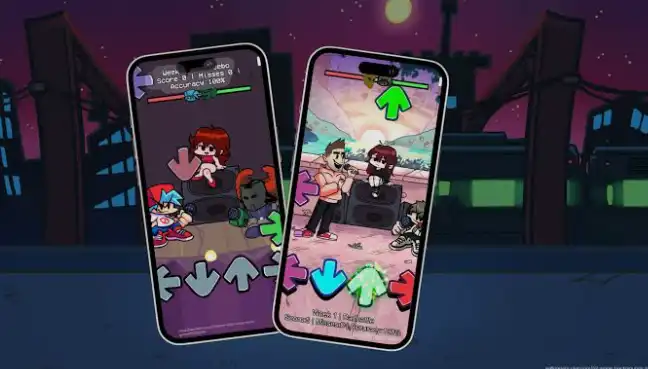
Friday Night Funkin’ (FNF) is a fast-paced rhythm game built around music, timing, and challenging note patterns. The original game was created by The Funkin’ Crew and has grown into a large modding community where creators produce custom songs, characters, charts, stages, and gameplay systems. The official project describes FNF as a rhythm game built with HaxeFlixel and provides an official iOS version through the App Store.
When people search for FNF Mod iOS IPS, they are generally looking for an iPhone/iPad-compatible modified or custom build of Friday Night Funkin’. An IPS file can also refer to a patch rather than a complete application, so compatibility depends on what the particular mod author has created. It is important to distinguish community-made modifications from the official FNF mobile release.
The official mobile version has received substantial updates. Recent versions added improved mobile input, performance optimizations, cloud saving, FNFC chart-file support, haptics, and other improvements.
What Makes FNF Different?
The central idea is simple: notes move toward receptors and the player must tap the corresponding controls at the correct moment. The challenge increases as songs become faster and charts become more complicated.
FNF’s popularity comes largely from its combination of catchy music, animated characters, humorous storytelling, and an enormous modding scene. Community engines such as Kade Engine have also introduced features such as improved input handling, detailed performance information, customizable controls, replays, and audio-offset adjustment.
How to Use FNF Mod iOS IPS
Start With a Compatible Build
Before attempting to use an IPS patch, identify exactly which FNF version or engine it targets. An IPS patch designed for one build may not work with another build. Check the mod’s documentation for the required base version, device requirements, and installation method.
For the safest experience, use the official mobile release when you simply want to play FNF on an iPhone or iPad. The official project confirms that iOS and Android builds are available.
Learn the Rhythm Controls
Once the game is running, select a song and watch the incoming notes. Tap the corresponding direction or touch control as each note reaches its target.
Start with easier songs before moving to difficult charts. Good timing is more important than rapidly tapping the screen because unnecessary inputs can cause misses and reduce your score.
Adjust Timing and Input Settings
Rhythm games can feel difficult when audio and touch input are slightly out of sync. FNF includes mobile-oriented input improvements, and recent releases have continued improving input latency and performance. The current mobile version has also moved to SDL3 input technology for more precise scoring.
If a custom build includes timing or offset controls, use them to match the game to your device and headphones.
Explore Different Game Modes
Depending on the version or mod, you may find Story Mode, Freeplay, custom songs, custom characters, and other gameplay content. The official mobile release includes the desktop songs and continues to receive additional content and improvements.
Functions and Features
Rhythm-Based Gameplay
FNF’s main function is rhythm-based note matching. Each song contains a chart that determines when notes appear and which inputs the player needs to perform.
Successful inputs contribute to your performance while missed notes can break combos. This makes every song a mixture of memorization, timing, concentration, and reaction speed.
Story Mode
Story Mode gives the game a progression-based structure. Players move through encounters and songs while following the game’s characters and animated scenes.
The mode is useful for newcomers because it introduces the gameplay gradually while also providing the narrative side of FNF.
Freeplay Mode
Freeplay is designed for players who want to select songs directly instead of following a progression. It is especially useful for practicing difficult tracks and replaying favorites.
Recent official updates have also continued expanding the game’s song selection and mobile functionality.
Custom Charts and Mod Support
One of FNF’s biggest strengths is modding. The official project provides documentation for people interested in creating modifications, while the community has developed numerous engines and tools around the game.
Some versions can support custom charts, songs, characters, dialogue, stages, and gameplay mechanics. Compatibility varies significantly between engines and individual mods.
Touchscreen Controls
The official mobile release includes touch input compatibility for menus and mobile-focused controls. This makes FNF playable without a physical keyboard or controller.
Touch controls are particularly useful on iPhone, while the larger display of an iPad can make complicated charts easier to see.
Haptic Feedback
Mobile FNF includes haptic feedback in several areas, giving compatible devices physical feedback during certain interactions.
This feature can make menus and gameplay interactions feel more responsive, although players who prefer minimal distractions can choose their preferred settings when available.
Performance Optimization
Mobile builds require careful memory and graphics management. The official mobile version uses ASTC graphics compression to reduce memory usage, while subsequent updates have introduced additional performance optimizations.
This is particularly useful for longer sessions and devices with limited available memory.
Cloud Saving and Chart Files
Recent official mobile releases added Newgrounds login and cloud save support, along with the ability to open FNFC chart files through the filesystem.
These additions make the mobile version more useful for players who move between compatible devices or experiment with custom chart content.
Audio Offset and Timing
Timing calibration is an important function for rhythm games. Community FNF engines such as Kade Engine provide audio-offset controls so players can compensate for speaker or headphone delay.
Whether a particular IPS or mod contains this feature depends on the engine used by that build.
Detailed Performance Information
Some FNF engines provide additional statistics such as accuracy, combo breaks, notes per second, and grades. Kade Engine is one example of a community engine that adds these quality-of-life features.
These statistics are useful for players who want to improve rather than simply complete songs.
Premium/MOD Features
Because FNF Mod iOS IPS describes a community-modified build, advertised features can vary considerably. There is no single universal “FNF Mod” with identical modifications.
Depending on the specific community build, a mod may include:
- Custom songs and charts
- New characters
- New stages and backgrounds
- Modified gameplay mechanics
- Additional difficulty levels
- Custom menus and visual effects
- Alternative note patterns
- Engine improvements
- Custom animations
- New dialogue and story sequences
These should be treated as mod-specific features rather than standard features of every FNF installation.
The official mobile game itself uses an in-app purchase to permanently disable advertisements in its full version, so claims that every “MOD IPA” automatically contains every premium feature should be treated carefully.
Who Should Use FNF Mod iOS?
Rhythm Game Fans
FNF is a natural choice for people who enjoy music games based on reaction speed and precise timing. Its simple concept makes it easy to understand while advanced charts provide a serious challenge.
FNF Mod Enthusiasts
Players who already know the original game may enjoy community modifications because they can introduce completely different songs, characters, stories, and mechanics.
Players Who Prefer Mobile Gaming
The official iOS version means players can experience FNF without relying on a desktop computer. iPhone provides portability, while iPad offers a larger touchscreen for easier visibility.
Players Interested in Creating Mods
FNF is also suitable for users interested in game development and rhythm-game chart creation. The official project provides modding resources, making it possible to learn how the game’s content can be customized.
How to Install FNF on iPhone and iPad
Official Installation
The simplest and safest method is to install the official Friday Night Funkin’ Mobile release from the App Store. The official source code repository confirms the availability of an iOS build, and Apple’s App Store listing provides the mobile release and its version history.
General steps are:
- Open the App Store on your iPhone or iPad.
- Search for Friday Night Funkin’ Mobile.
- Verify that the listing is the official release.
- Tap Get or the purchase/download button.
- Authenticate with your Apple Account if requested.
- Wait for installation to complete.
- Launch the game and configure the controls and timing settings.
Installing a Community IPS or Modified Build
An IPS file is normally a patch and not necessarily an installable iOS application by itself. The correct procedure depends on the patch format, base game, engine, and distribution method supplied by its creator.
Do not assume that renaming an IPS file to IPA will make it installable. A patch must be applied to the correct compatible software, and improperly modified packages can fail to launch or potentially contain unwanted code.
For example, an older community iOS port called FunkiniOS documented installation through tools such as AltStore or Filza/AppSync, but it is a separate community project and should not be confused with the current official mobile release.
iPhone and iPad Compatibility
Compatibility depends on the specific build. Official FNF mobile releases are designed for Apple’s supported iOS/iPadOS environment, while unofficial ports and IPS patches may have narrower device requirements.
Always check the exact requirements supplied with a community mod before installing it.
Is FNF Supported on the Latest iOS Versions?
Current iOS Compatibility
The official FNF mobile release is actively maintained and has continued receiving updates during 2026. Apple’s listing shows version 0.8.6, dated August 12, 2026, with updates including an SDL3-based input system, performance improvements, and visual fixes.
That makes the official App Store release the better choice for users who want the strongest likelihood of compatibility with current iPhone and iPad software.
Unofficial IPS builds are different. A community mod may have been compiled for an older SDK or depend on an older engine, so it may not work correctly on every current iOS/iPadOS version.
Compatibility Tips
Before installing an unofficial build:
- Check the supported iOS/iPadOS versions.
- Confirm whether your device architecture is supported.
- Check whether the mod requires a particular FNF version.
- Keep a backup of important game data.
- Prefer trusted, transparent mod projects.
- Avoid modified packages from unknown sources.
FAQs
What is FNF Mod iOS IPS?
FNF Mod iOS IPS generally refers to a community modification or IPS patch associated with Friday Night Funkin’ for iPhone or iPad. The exact features and installation requirements depend on the specific mod.
Is Friday Night Funkin’ officially available on iPhone?
Yes. The Funkin’ Crew’s official project states that an iOS version is available through the App Store.
Can I install an IPS file directly on an iPhone?
Usually, no. IPS is generally a patch format rather than a normal iOS application package. You need the correct compatible base software and patching method specified by the mod creator.
Is FNF free on iOS?
The official mobile release uses a free-to-start model with advertising, while its full version can be upgraded through an in-app purchase to permanently disable advertisements.
Does FNF support mods on iOS?
The official project supports modding, and recent mobile releases have added features useful for custom content, including FNFC chart-file opening. However, not every desktop mod will automatically work on iOS.
Can I play FNF on an iPad?
Yes. The official FNF mobile release is available for iPad through the App Store.
What is the latest official FNF mobile version?
Apple’s current listing shows version 0.8.6, released August 12, 2026, according to the version history currently displayed on the App Store.
Is every FNF Mod IPA safe?
No. Community-made modified applications can come from many different sources. Use reputable projects, verify what you are installing, and avoid unknown packages that request unnecessary permissions or contain suspicious modifications.
Conclusion
FNF remains one of the most recognizable rhythm games in the modding community because its core gameplay is simple while its customization possibilities are extensive. On iPhone and iPad, the official mobile release now provides a mature touchscreen experience with continued performance, input, and content improvements.
For users searching specifically for FNF Mod iOS IPS, the most important point is to identify whether the file is an IPS patch, a complete modified application, or a port based on a particular FNF engine. Different builds can have completely different compatibility requirements and features.
For the most reliable experience on current Apple devices, the official App Store version is the preferred starting point. Community IPS and mod projects can be interesting for experienced users, but they should always be checked for compatibility, provenance, and the correct installation method before use.