

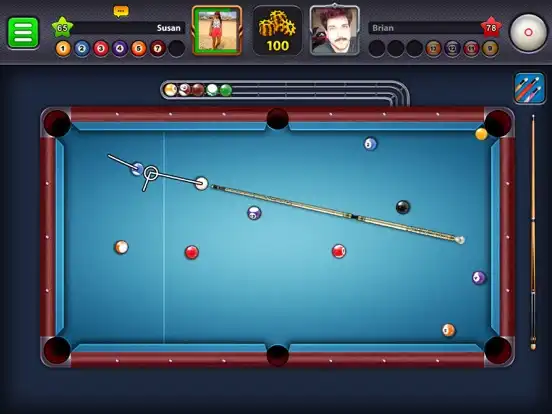

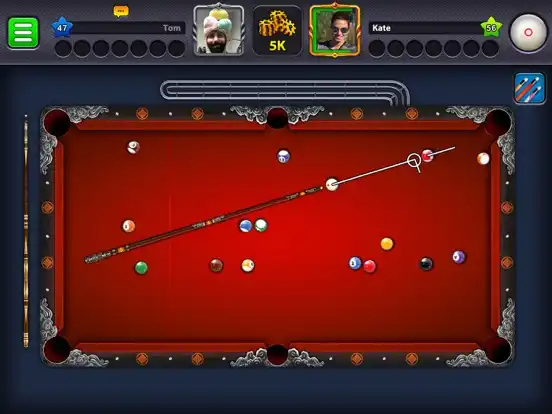


8 Ball Pool is a competitive online pool game that brings realistic billiards gameplay to iPhone and iPad. Developed by Miniclip, the game lets players practice their shots, compete against other players in PvP matches, challenge friends, participate in tournaments, collect cues, and progress through a level-based system.
The game focuses on accurate aiming, cue control, positioning, and strategy rather than simply hitting the balls. Players can select different tables, customize their cues, earn Pool Coins, and unlock access to higher-level match locations as they progress.
The official iOS version is free to download with optional in-app purchases. It requires an internet connection because its main competitive modes are online.
The current App Store information lists Miniclip SA as the provider, with the app categorized under Sports. It is available for iPhone and iPad and includes Game Center support for leaderboards and achievements.
How to Use 8 Ball Pool
After installing 8 Ball Pool on your iPhone or iPad, launch the game and follow the initial setup instructions. You can sign in using an available account option and then enter the game’s pool environment.
New players can start by practicing their shots before entering more competitive matches. During a game, drag the cue to position your shot, adjust your aim, choose the appropriate amount of power, and release the shot when you are ready.
The objective depends on the selected game mode, but traditional 8-ball matches require players to pocket their assigned balls and eventually sink the black 8-ball according to the rules.
As you win matches, you can earn Pool Coins and improve your level. Higher progression can provide access to additional locations and competitive opportunities.
Features and Functions
Realistic 3D Pool Gameplay
8 Ball Pool provides a 3D billiards environment designed around familiar pool mechanics. The table, balls, cue movement, aiming system, and physics create a gameplay experience that is easy for beginners to understand while still giving experienced players room to develop advanced strategies.
PvP Multiplayer Matches
The main attraction is online player-versus-player competition. You can challenge other players in real-time matches and test your ability to aim, control power, and plan several shots ahead.
The competitive format makes every turn important because a missed shot can give your opponent an opportunity to take control of the table.
Play With Friends
Players can challenge friends to online pool matches. The official listing states that players can sign in with supported accounts and challenge friends directly.
This makes the game suitable for casual sessions as well as competitive matches between people who already know each other.
Practice Arena
Practice is useful for learning the controls before risking Pool Coins in competitive matches. You can use practice sessions to understand the aiming system, power control, cue movement, and ball positioning.
Beginners can spend time learning basic shots before moving into more competitive tables.
Pool Coins and Rewards
Pool Coins are part of the game’s progression and competitive economy. Winning eligible matches can reward players with coins, while the Pool Shop provides opportunities to obtain different items.
Because competitive matches can involve in-game currency, players should understand the entry requirements of each table before starting a match.
Cue Customization
Cue selection is an important part of the experience. Players can collect and customize cues as they progress.
Different cues can provide different gameplay characteristics, making cue collection another progression system for players who want to improve their performance.
Pool Table Variety
The game includes multiple pool tables and match locations. Higher progression can unlock additional competitive locations, giving players more variety as they advance through the game.
Level and Ranking System
8 Ball Pool uses a level-based progression system. Players can increase their level through gameplay and compete against increasingly challenging opponents.
The ranking system adds another reason to keep playing because victories contribute to long-term progression and competitive goals.
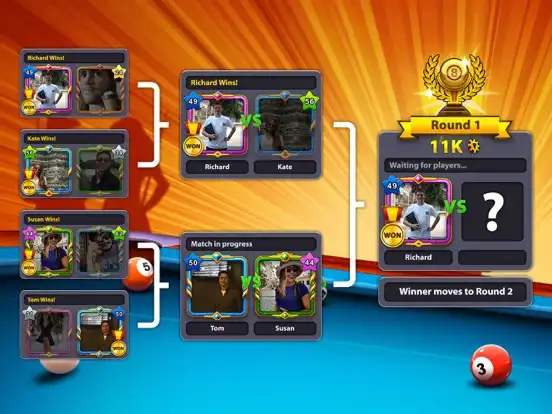
Tournaments and Events
The game regularly introduces special events and seasonal content. Recent App Store information mentions tournaments with friends, special avatar frames, Club Quests, and additional table formats such as 10 Ball and Short Rack.
These events help keep the game fresh for players who have already mastered the standard matches.
Avatar Customization
Players can personalize their profile with avatar-related customization. Recent updates have added animated avatar frames and other profile personalization options.
This gives players another way to make their in-game identity different from other competitors.
Cue Collection
Collecting cues is an important long-term feature. The game has continued adding tools that help players search, filter, and sort their cue collections, making it easier to manage a growing inventory.
Game Center Support
On compatible Apple devices, 8 Ball Pool supports Game Center features such as leaderboards and achievements.
This can make the game more engaging for users who enjoy tracking achievements and comparing progress.
In-App Purchases
The official iOS version is free to play but contains optional purchases. The App Store currently lists products including Pool Passes, Golden Spins, Golden Shots, coins, cash, and special packs.
Players can therefore enjoy the basic game without necessarily purchasing anything, while optional paid content can provide additional resources or rewards.
Online Functions
Because 8 Ball Pool is designed around online multiplayer gameplay, an internet connection is required.
Its main online functions include:
- Real-time PvP matches
- Playing against friends
- Multiplayer tournaments
- Competitive league progression
- Leaderboards
- Events and seasonal content
- Club-related activities
- Online rewards and progression
The exact availability of individual events and features can change as Miniclip releases new updates.
Who Should Use 8 Ball Pool?
8 Ball Pool is a good choice for players who enjoy billiards, competitive multiplayer games, and short online matches. It can work particularly well for:
- Pool and billiards fans
- Players who enjoy PvP competition
- People who want to play pool with friends
- Casual mobile gamers
- Players interested in tournaments and events
- Users who enjoy collecting and customizing in-game items
- Players who like progression and leaderboard systems
It is less suitable for someone specifically looking for a completely offline pool game because an internet connection is required.
Installation, iOS Support, and FAQs
How to Install 8 Ball Pool on iPhone
For the safest installation, use Apple’s official App Store rather than an unofficial IPA source.
- Open the App Store on your iPhone.
- Search for 8 Ball Pool.
- Confirm that the developer is Miniclip.com.
- Tap Get.
- Authenticate with Face ID, Touch ID, or your Apple Account if requested.
- Wait for the installation to finish.
- Open the game and complete the initial setup.
- Sign in if you want to use supported account features and play with friends.
The official listing identifies Miniclip.com as the developer and provides the iPhone version through the App Store.
How to Install 8 Ball Pool on iPad
The game is also available for iPad.
Open the App Store on your iPad, search for 8 Ball Pool, verify the developer, and tap Get. After installation, launch the game and follow the on-screen instructions.
If you are specifically looking for an IPA installation rather than the App Store version, compatibility and signing requirements can vary depending on the installation method. Using the official App Store is generally the simplest and safest option.
Is 8 Ball Pool Supported on the Latest iOS Versions?
The official App Store currently states that 8 Ball Pool requires iOS 13.0 or later on iPhone and iPadOS 13.0 or later on iPad.
That means devices running modern supported iOS/iPadOS versions meet the stated minimum operating-system requirement. However, device compatibility can also depend on Apple’s hardware requirements and future updates from Miniclip.
For the most accurate compatibility information, check the current App Store listing before installing.
Is 8 Ball Pool Free on iOS?
Yes. The official iOS version is listed as free, but it includes optional in-app purchases.
Does 8 Ball Pool Need Internet?
Yes. The official listing states that an internet connection is required.
Can I Play 8 Ball Pool With Friends?
Yes. The game supports multiplayer competition and allows players to challenge friends in PvP matches.
Is 8 Ball Pool Available on iPad?
Yes. The official listing supports both iPhone and iPad.
Who Is the Publisher of 8 Ball Pool?
8 Ball Pool is developed by Miniclip.com, while the App Store identifies Miniclip SA as the provider.
What Category Is 8 Ball Pool?
The game is listed in the Sports category on the App Store.
Does 8 Ball Pool Have MOD or Premium Features?
The title “8 Ball Pool IPA For iOS” does not specifically mention MOD or Premium, so a separate MOD/Premium feature section is not applicable to this article.
The official version does include optional in-app purchases such as Pool Passes, Golden Spins, Golden Shots, coins, cash, and special packs.
Is 8 Ball Pool Safe to Install?
The safest approach is to install the official version through Apple’s App Store. Unofficial IPA files can come from unknown sources and may carry additional security, signing, privacy, or account risks.
Conclusion
8 Ball Pool is a feature-rich online billiards game that combines traditional pool mechanics with competitive multiplayer, progression, tournaments, cue collection, customization, events, and social gameplay. Its straightforward controls make it approachable for beginners, while strategic aiming and positioning give experienced players plenty of room to improve.
The official iOS version supports iPhone and iPad, requires iOS/iPadOS 13.0 or later, and requires an internet connection for its online gameplay.
For players looking for a competitive pool experience on Apple devices, 8 Ball Pool remains a strong choice, especially if you enjoy playing against friends, climbing rankings, collecting cues, and participating in recurring events.